How to Clean CCTV Cameras
A CCTV camera is only as effective as the footage it records. Over time, dust, rain, fingerprints, spider webs, bird droppings, and pollution can accumulate on the lens, reducing image clarity and making it difficult to identify important details. Learning how to clean CCTV cameras correctly helps maintain sharp video quality, extends the life of your surveillance equipment, and ensures reliable security monitoring.
Whether you have cameras installed at home, in an office, or around a commercial property, this guide explains how to clean CCTV cameras safely using the right tools and techniques.
Why Learning How to Clean CCTV Cameras Is Important
Understanding how to clean CCTV cameras is essential because even a thin layer of dirt can affect image quality. Blurry footage may prevent you from identifying faces, licence plates, or suspicious activity when reviewing recordings. Regular camera maintenance helps you:
- Maintain high-definition video quality
- Improve facial and vehicle recognition
- Extend camera lifespan
- Protect the lens from permanent damage
- Improve infrared night vision performance
- Reduce long-term maintenance costs
Clean cameras deliver better surveillance performance year-round.
Signs Your CCTV Camera Needs Cleaning
Before learning how to clean CCTV cameras, it’s helpful to recognise when maintenance is needed. Inspect your cameras if you notice:
- Blurry or hazy footage
- Dust covering the lens
- Water spots after rainfall
- Spider webs around the camera
- Poor night vision
- Increased glare from lights
- Dark marks or smudges in recordings
Routine inspections help prevent these issues from becoming bigger problems.
Tools You Need to Clean CCTV Cameras
Using the right equipment makes cleaning both safe and effective.
Recommended Cleaning Supplies
- Microfibre cloth
- Lens cleaning solution
- Soft camera brush
- Air blower or compressed air
- Cotton swabs
- Soft dry cloth
- Stable ladder (if required)
Avoid Using
- Paper towels
- Rough fabrics
- Household glass cleaner
- Abrasive cleaning pads
- High-pressure water
- Harsh chemicals
These items can scratch the lens or damage protective coatings.
How to Clean CCTV Cameras Step by Step
If you’re wondering how to clean CCTV cameras, follow these simple steps for the best results.
Step 1: Turn Off the Camera
Before cleaning, switch off the camera or disconnect its power supply. This reduces electrical risks and allows you to inspect the camera safely.
Step 2: Remove Dust and Loose Dirt
Use a soft brush or air blower to remove:
- Dust
- Cobwebs
- Sand
- Loose debris
Avoid wiping the lens before removing dust, as small particles may scratch the surface.
Step 3: Clean the Camera Lens
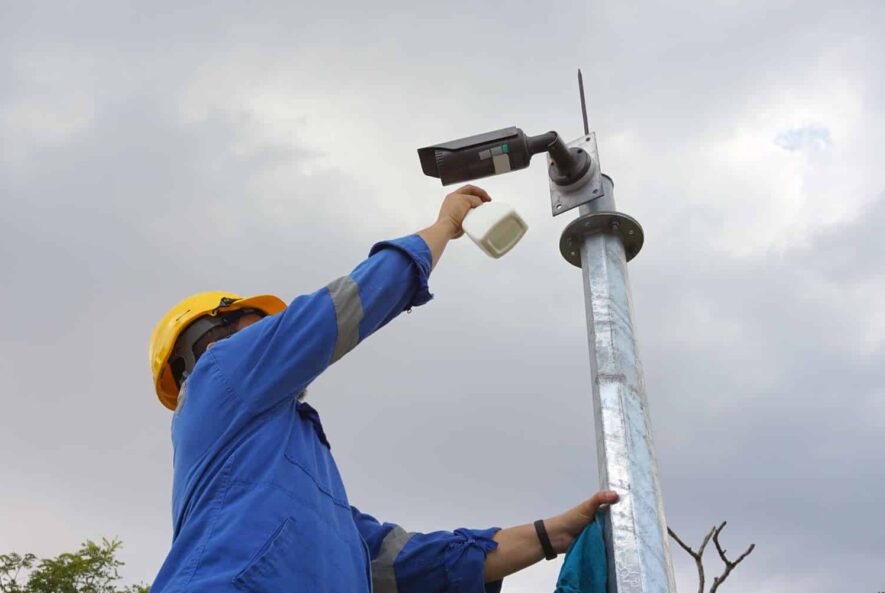
One of the most important parts of how to clean CCTV cameras is cleaning the lens correctly. Apply a small amount of lens cleaning solution to a microfibre cloth—not directly onto the camera. Gently wipe the lens using circular motions from the centre outward until it is clean and streak-free.
Step 4: Wipe the Camera Housing
The camera housing also collects dirt and grime. Use a slightly damp microfibre cloth to clean:
- Camera body
- Mounting bracket
- Sun shield
- Infrared LED cover
Prevent water from entering any openings.
Step 5: Inspect the Camera
As part of how to clean CCTV cameras, check for:
- Loose screws
- Cracked housing
- Damaged cables
- Worn weather seals
- Signs of corrosion
Early maintenance can prevent expensive repairs.
Step 6: Test the Camera
After cleaning:
- Restore power
- Check live footage
- Verify focus and clarity
- Test night vision
- Confirm the viewing angle
This final inspection ensures your camera is functioning properly.
How Often Should You Clean CCTV Cameras?
Knowing how to clean CCTV cameras is only part of proper maintenance. Cleaning frequency depends on the installation environment.
| Installation Location | Recommended Cleaning |
|---|---|
| Indoor home cameras | Every 3–6 months |
| Outdoor residential cameras | Every 2–3 months |
| Offices | Every 2 months |
| Retail stores | Monthly |
| Industrial sites | Monthly |
| Coastal areas | Monthly |
| Construction sites | Every 2–4 weeks |
Dusty or high-traffic locations may require more frequent cleaning.
Tips for Cleaning Outdoor CCTV Cameras
Outdoor cameras are constantly exposed to changing weather conditions. When practising how to clean CCTV cameras, remember to:
- Remove spider webs regularly.
- Clean away rainwater spots.
- Wipe bird droppings immediately.
- Check for insect nests.
- Trim nearby branches.
- Inspect mounting brackets after storms.
Regular maintenance helps maintain clear surveillance throughout the year.
Common Mistakes to Avoid
Even when you know how to clean CCTV cameras, and common CCTV installation mistakes to avoid:
- Spraying cleaner directly onto the lens
- Using paper towels
- Applying excessive pressure
- Cleaning with dirty cloths
- Using harsh chemicals
- Ignoring damaged seals
- Forgetting to test the camera afterwards
Proper cleaning protects both the lens and internal components.
Weather and CCTV Camera Maintenance
Outdoor security cameras face constant exposure to:
- Rain
- Snow
- Dust
- Humidity
- Salt air
- Pollen
- UV sunlight
Understanding how to clean CCTV cameras helps minimise the impact of these environmental conditions and keeps your surveillance system operating efficiently.
Additional CCTV Maintenance Tips
Besides learning how to clean CCTV cameras, you should also:
- Update camera firmware
- Check recording quality regularly
- Inspect storage devices
- Test motion detection
- Verify remote viewing
- Review camera positioning after severe weather
- Check power and network connections
A complete maintenance routine helps maximise system reliability.
FAQs
1. Can I use glass cleaner on CCTV cameras?
No. Glass cleaners may damage the protective coating on the camera lens. Always use a dedicated lens cleaning solution.
2. Does cleaning improve night vision?
Yes. A clean lens and infrared cover allow the camera to capture clearer images in low-light conditions.
3. Can I wash outdoor CCTV cameras with a hose?
No. High-pressure water can damage seals and allow moisture inside the camera housing.
4. Should I clean CCTV cameras myself?
Most homeowners can safely clean accessible cameras using the correct tools. For high-mounted or commercial systems, professional maintenance may be the safer option.
Final Thoughts
Knowing how to clean CCTV cameras is an important part of maintaining a reliable security system. Regular cleaning removes dirt, improves image quality, supports better night vision, and extends the lifespan of your cameras. By following the steps in this guide and scheduling routine maintenance, you can ensure your CCTV system continues to deliver clear, dependable footage when you need it most.