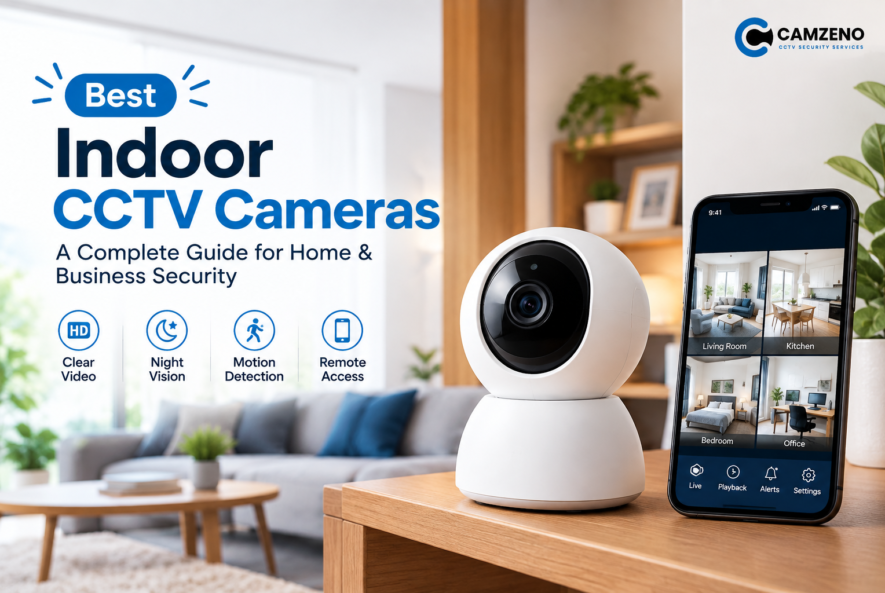
Best Indoor CCTV Cameras
Indoor security is no longer just about locking doors and windows. Whether you want to protect your family, monitor valuable belongings, keep an eye on children or pets, or improve security inside your business, an indoor CCTV camera can provide an extra layer of protection.
Modern indoor cameras offer much more than basic video recording. Features such as HD and 2K video, night vision, motion detection, two-way audio, smart alerts, and local storage can make monitoring easier and more effective.
But with so many options available, how do you choose the right one? This guide explains what to look for when choosing the best indoor CCTV cameras and which features matter most.
What Are Indoor CCTV Cameras?
Indoor CCTV cameras are surveillance cameras designed specifically for monitoring the inside of homes, offices, shops, warehouses, and other enclosed spaces.
Unlike outdoor CCTV cameras, indoor models generally don’t need weatherproof housing. They are usually compact, easy to install, and designed to provide clear footage in rooms with different lighting conditions. Depending on the model, an indoor CCTV camera may support:
- HD, Full HD, 2K, or 4K video
- Infrared night vision
- Motion detection
- Person detection
- Two-way audio
- Pan and tilt functionality
- Local or cloud storage
- Mobile app monitoring
- Smart notifications
For many indoor applications, 2K resolution can offer a useful balance between image detail and storage requirements, while 4K can be beneficial when you need more detail or plan to crop footage.
Why Should You Install an Indoor CCTV Camera?
An indoor CCTV camera can help you monitor important areas even when you’re away.
- Improve Home Security
A visible camera can help you monitor entrances, hallways, living areas, and other important indoor spaces.
- Monitor Children and Pets
Indoor cameras can make it easier to check on children or pets while you’re working, travelling, or away from home.
- Protect Your Business
For offices and shops, cameras can help monitor staff areas, stockrooms, cash-handling areas, and customer spaces.
- Check Activity Remotely
Many modern cameras connect to mobile apps, allowing you to view live footage remotely and receive alerts when activity is detected.
- Record Important Events
Depending on the storage system, cameras can save footage for later review.
Key Features of the Best Indoor CCTV Cameras
Not every camera offers the same level of protection. Before buying, consider these important features.
1. High-Quality Video Resolution
Clear video is one of the most important features of any CCTV system. 1080p Full HD works well for basic indoor monitoring, while 2K and 4K cameras provide more detail for larger rooms or situations where identifying people and objects matters.
However, higher resolution isn’t automatically better. Lens quality, lighting, dynamic range, positioning, and compression can also affect the usefulness of recorded footage.
2. Night Vision
Security doesn’t stop when the lights go out. Look for indoor cameras with infrared night vision if you need reliable monitoring after dark. Some newer cameras also provide colour night vision under suitable lighting conditions.
Night vision is especially useful for:
- Bedrooms and hallways
- Offices after working hours
- Shops
- Storage rooms
- Entry areas
- Garages and indoor parking spaces
3. Motion Detection
Instead of recording every second, motion detection can identify activity and trigger recording or notifications. More advanced cameras can distinguish between different types of movement, such as people or pets. This can reduce unnecessary footage and make important events easier to find.
4. Two-Way Audio
Two-way audio allows you to communicate through the camera using a built-in microphone and speaker. For example, you could:
- Speak to a family member
- Communicate with staff
- Talk to a delivery person
- Check on a pet
- Warn someone away from a restricted area
5. Pan, Tilt and Wide-Angle Coverage
A fixed camera monitors one direction, while a pan-and-tilt camera can cover a wider area. For larger rooms, a pan-and-tilt indoor CCTV camera can be useful because you can adjust the viewing direction remotely. This can help reduce blind spots without installing several fixed cameras.
6. Local vs Cloud Storage
Storage is another important decision. With local storage, footage can be saved to a microSD card, recorder, hub, NAS, or NVR. Cloud storage sends footage to remote servers and can make remote access and backup convenient.
Local Storage
Advantages:
- Less dependence on cloud subscriptions
- Greater control over stored footage
- Useful for continuous recording
- Can reduce recurring costs
Cloud Storage
Advantages:
- Convenient remote access
- Easier off-site backup
- No need to manage local storage in some setups
Some cameras support a combination of local and cloud storage, giving homeowners more flexibility.
7. Privacy Features
Privacy is particularly important with indoor cameras because they operate inside private spaces. Look for features such as:
- Privacy mode
- Physical privacy shutters
- Strong account security
- Secure authentication
- User access controls
- Encrypted connections
You should also carefully consider camera placement. Avoid unnecessarily recording private areas or spaces that don’t require surveillance.
8. Mobile App Access
A good CCTV camera should make monitoring convenient. A mobile app can allow you to:
- View live footage
- Receive motion alerts
- Review recordings
- Adjust camera settings
- Communicate through two-way audio
- Control pan-and-tilt cameras
Before choosing a camera, check whether its app provides the features you actually need.
Best Indoor CCTV Cameras for Different Needs
There isn’t one camera that is perfect for everyone. The right choice depends on where you plan to install it.
| Need | Recommended Camera Type |
|---|---|
| Small room | Compact fixed indoor camera |
| Living room | Wide-angle or pan-tilt camera |
| Baby monitoring | Indoor camera with audio and smart alerts |
| Pet monitoring | Pan-tilt camera with motion detection |
| Office | Fixed HD/2K CCTV camera |
| Shop | Wide-angle camera with night vision |
| Large indoor area | High-resolution or PTZ camera |
| 24/7 recording | CCTV camera connected to local storage/NVR |
Where Should You Install Indoor CCTV Cameras?
Correct positioning can be just as important as the camera itself. Consider installing cameras in areas such as:
- Main Entrance – A camera facing an interior entrance can help record people entering and leaving.
- Hallways – Hallway cameras can monitor movement between different rooms.
- Living Areas – A strategically positioned camera can provide broad coverage without unnecessarily monitoring private spaces.
- Offices – Indoor CCTV can help monitor work areas, entrances, storage spaces, and other important locations.
- Shops – Cameras can monitor customer areas, counters, stockrooms, and other key points.
- Storage Areas – A camera can provide additional protection for valuable inventory and equipment.
Common Mistakes to Avoid
Choosing a camera based only on its megapixel count can lead to disappointing results. Avoid these common mistakes:
- Buying a camera with poor night performance
- Ignoring storage requirements
- Installing the camera too high or at the wrong angle
- Choosing a camera with an unsuitable field of view
- Forgetting about Wi-Fi signal strength
- Ignoring privacy settings
- Failing to secure the camera account
- Choosing a cloud-dependent camera without checking subscription requirements
A camera is only effective when it is properly selected, positioned, configured, and maintained.
FAQs
1. What is the best resolution for an indoor CCTV cameras?
For many indoor applications, 1080p provides good basic quality, while 2K offers additional detail without the storage demands of 4K.
2. Do indoor CCTV cameras work at night?
Yes. Many indoor CCTV cameras include infrared night vision that allows them to capture footage in low-light or dark conditions.
3. Can I watch an indoor CCTV cameras remotely?
Yes. Many modern cameras connect to a mobile app, allowing users to view live footage and receive alerts remotely.
4. Is local storage better than cloud storage?
Neither is universally better. Local storage can provide greater control and reduce subscription dependence, while cloud storage can offer convenient remote access and off-site backup.
5. Are indoor CCTV cameras suitable for offices?
Yes. Indoor CCTV cameras can be used in offices to monitor entrances, workspaces, storage areas, and other appropriate locations.
6. Do indoor CCTV cameras record audio?
Some models include microphones and speakers, providing audio recording and/or two-way communication. Always check the camera’s specifications and applicable privacy requirements.
7. How many indoor CCTV cameras do I need?
It depends on the size and layout of the property. Start by identifying important entrances, rooms, corridors, and areas that require monitoring, then select camera positions that provide useful coverage without unnecessary overlap.
Final Thoughts
The best indoor CCTV cameras combine clear video, reliable night vision, useful motion detection, convenient storage, strong privacy controls, and easy remote monitoring.
For basic indoor surveillance, a quality 1080p or 2K camera may be enough. For larger rooms or applications where extra detail matters, a higher-resolution or pan-and-tilt camera can be a better choice.
Most importantly, don’t choose a camera based on specifications alone. Think about where you’ll install it, what you need to monitor, how footage will be stored, and how you’ll access it. With the right indoor CCTV setup, you can create a more secure and manageable environment for your home or business.