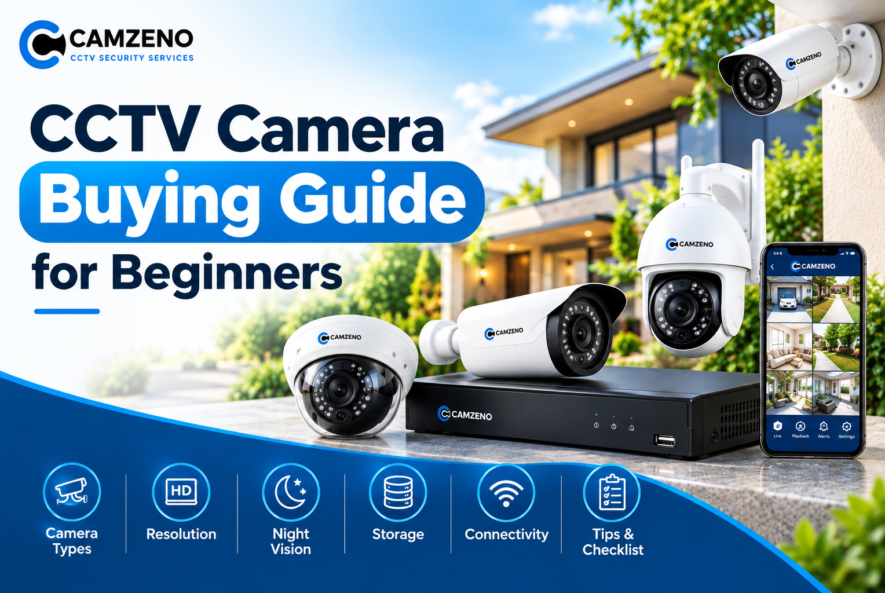
CCTV Camera Buying Guide for Beginners
Buying a CCTV camera for the first time can feel confusing. You’ll need to consider different camera types, resolutions, storage options, night-vision features, recording systems, and connectivity choices. The good news? You don’t need to be a security expert to choose the right system.
This CCTV camera buying guide for beginners explains the key factors to consider before you buy, so you can choose a surveillance system that matches your property, security needs, and budget.
1. Start by Identifying Your Security Needs
Before looking at camera specifications, think about what you want to monitor. Are you protecting a home, office, shop, warehouse, apartment, or outdoor area? Different locations may require different camera features.
For example:
- Front doors: A camera with clear facial visibility and night vision can be useful.
- Driveways: Weather-resistant outdoor cameras with a wide viewing angle are often suitable.
- Large rooms: A camera with a wider field of view can cover more space.
- Shops: High-resolution cameras can help monitor customers, counters, and entrances.
- Warehouses: Cameras with wider coverage and reliable night vision may be needed.
- Outdoor areas: Weather-resistant cameras are important for protection against changing conditions.
Start with the areas you want to monitor, then choose the camera features around those requirements.
2. Choose the Right CCTV Camera Type
CCTV cameras come in several designs, and each has its own advantages.
Dome Cameras
Dome cameras have a compact, rounded design and are commonly installed indoors, in offices, shops, and other commercial spaces. Their discreet appearance makes them suitable for areas where you don’t want the camera to be too noticeable.
Bullet Cameras
Bullet cameras have a longer, more visible design and are commonly used for outdoor surveillance. They can be a good option for monitoring entrances, gates, driveways, parking areas, and building perimeters.
WiFi Cameras
WiFi CCTV cameras connect to a wireless network rather than relying entirely on traditional wired network connections. They can be convenient for homes and smaller installations, particularly where running cables is difficult. However, they still need a reliable power source and a stable WiFi connection.
PTZ Cameras
PTZ stands for Pan, Tilt, and Zoom. These cameras can move horizontally and vertically and may offer optical zoom, making them useful for monitoring larger areas where adjustable coverage is required.
3. Pay Attention to Camera Resolution
Resolution determines how much detail your CCTV camera can capture.
Common CCTV resolutions include:
- 2MP: Suitable for basic monitoring
- 4MP: Provides more detail than standard 2MP cameras
- 5MP: Useful when clearer identification is required
- 8MP / 4K: Provides significantly higher image detail
A higher resolution can help you see important details such as faces, signs, objects, and license plates more clearly. However, higher resolution also means larger video files and potentially greater storage requirements.
So don’t simply choose the highest resolution available. Choose one that matches the area you’re monitoring and the level of detail you actually need.
4. Check the Night Vision Capability
Security threats don’t disappear after sunset. That’s why night vision is one of the most important features to consider.
When comparing cameras, check:
- Night-vision range
- Infrared (IR) LEDs
- Low-light performance
- Color night vision, if available
- Image clarity in complete darkness
For outdoor locations, consider the distance between the camera and the area you want to monitor. A camera advertised with a long night-vision range may not deliver the same level of useful detail throughout that entire distance.
5. Wired or WiFi CCTV Camera?
One of the biggest decisions for beginners is choosing between wired and wireless connectivity.
Wired CCTV Cameras
Wired systems typically provide a stable connection and are commonly used for complete home, office, commercial, and industrial surveillance installations. They can be particularly suitable when you need multiple cameras and continuous recording.
WiFi CCTV Cameras
WiFi cameras are generally easier to install where running cables is difficult. They can be convenient for apartments, small offices, rooms, and temporary monitoring setups.
However, network reliability is important because connection problems can affect remote viewing or other network-dependent features.
6. Decide Between DVR and NVR
The recording system is another important part of your CCTV setup.
DVR
A Digital Video Recorder (DVR) is commonly used with analog CCTV cameras. The cameras generally transmit video to the recorder through coaxial cabling.
NVR
A Network Video Recorder (NVR) is designed for network/IP cameras. NVR systems can provide high-resolution recording and network-based features, depending on the cameras and recorder you choose.
For beginners, the simplest approach is to choose the recorder based on the camera technology you plan to use rather than treating DVR or NVR as universally better.
7. Think About Storage Before Buying
A CCTV system is only useful if you can keep the footage you need. Storage requirements depend on several factors, including:
- Number of cameras
- Camera resolution
- Recording quality
- Recording hours
- Motion detection
- Compression technology
- Required retention period
For example, a system with several high-resolution cameras recording continuously will require significantly more storage than a single camera recording only when motion is detected.
Common storage options include hard disk drives (HDDs) and, for some cameras, microSD cards. If you need footage stored for several days or weeks, calculate your storage requirements before purchasing the system.
8. Consider Motion Detection
Motion detection can help reduce unnecessary recordings and make important events easier to find. Instead of recording everything continuously, some systems can detect movement and trigger recording or alerts.
Depending on the system, you may also find features such as:
- Person detection
- Vehicle detection
- Line crossing alerts
- Intrusion detection
- Area-based monitoring
These features can be particularly useful when you receive frequent alerts and want to focus on events that matter.
9. Don’t Ignore Weather Resistance
If you’re installing a CCTV camera outside, make sure it is designed for outdoor use. Outdoor cameras may need protection against:
- Rain
- Dust
- Humidity
- Heat
- Cold
- Direct sunlight
Look for appropriate IP ratings and check the manufacturer’s specifications before installing a camera outdoors. An indoor camera may not withstand the environmental conditions found outside.
10. Check the Field of View
The field of view determines how much of an area the camera can see. A wide-angle camera can cover more space, while a narrower view can provide more focused monitoring.
Think about:
- The size of the area
- Camera mounting position
- Distance from the subject
- Potential blind spots
- Whether you need detailed or general coverage
A camera with a wide field of view isn’t automatically the right choice for every location. For example, monitoring a narrow entrance may require a different viewing angle than monitoring a large parking area.
11. Look for Remote Viewing
Modern CCTV systems can allow you to monitor your cameras remotely using a smartphone, tablet, or computer.
Before buying, check whether the system supports:
- Mobile app access
- Live video viewing
- Playback
- Motion alerts
- Multiple users
- Remote notifications
Remote viewing can be particularly useful when you’re away from home or managing a business. However, remote features generally depend on a reliable internet connection and properly configured equipment.
12. Check Audio Features
Some CCTV cameras include built-in microphones, speakers, or two-way audio. Two-way audio can allow you to communicate through the camera using a connected mobile app.
This can be useful for situations such as:
- Talking to visitors
- Communicating with staff
- Monitoring entrances
- Responding to delivery personnel
If audio matters to you, check whether the camera supports recording, two-way communication, or both.
13. Think About Installation and Camera Placement
Even an excellent CCTV camera can provide poor security if it is installed in the wrong location.
Before installation, consider:
- Camera height
- Lighting conditions
- Viewing angle
- Potential obstructions
- Blind spots
- Cable routes
- Access to power
- Protection from tampering
Avoid positioning cameras directly toward strong light sources because glare can reduce image quality. For important areas, consider whether multiple cameras are needed to provide overlapping coverage.
14. Don’t Choose a CCTV Camera Based Only on Price
Budget is important, but the cheapest camera isn’t always the most suitable option. Instead of comparing only prices, consider the overall system:
Camera + Recorder + Storage + Cabling + Power + Installation + Maintenance
A lower-priced camera may lack features you actually need, while an unnecessarily expensive camera may provide capabilities you won’t use. The goal is to find the right balance between price, coverage, image quality, reliability, and features.
15. Make Sure the Complete System Is Compatible
Before purchasing individual CCTV components, make sure they work together.
Check compatibility between:
- Cameras and DVR/NVR
- Resolution and recorder support
- Storage capacity
- Power requirements
- Network connections
- Mobile applications
- Accessories and cables
Buying cameras and recording equipment separately without checking compatibility can create unnecessary installation problems.
16. How Many CCTV Cameras Do You Need?
There isn’t one fixed number that works for every property.
The number depends on:
- Property size
- Number of entrances
- Number of floors
- Indoor areas
- Outdoor areas
- Security priorities
- Potential blind spots
For a small home, a few strategically positioned cameras may provide sufficient coverage. Larger properties may require several cameras covering entrances, corridors, parking areas, and other important locations. It’s better to plan camera placement first instead of simply buying a certain number of cameras.
17. A Simple CCTV Buying Checklist
Before purchasing your CCTV system, ask yourself:
☐ Where do I need surveillance?
☐ Do I need indoor, outdoor, or both types of cameras?
☐ What resolution do I need?
☐ Do I need clear night vision?
☐ Should I choose wired or WiFi cameras?
☐ Do I need a DVR or NVR?
☐ How many days of footage should I store?
☐ Do I need motion or person detection?
☐ Do I need remote smartphone access?
☐ Are the cameras weather-resistant?
☐ Is the field of view suitable for each location?
☐ Are all components compatible?
☐ Do I need professional installation?
Answering these questions before shopping can make the buying process much easier.
FAQs
1. What should beginners look for when buying a CCTV camera?
Beginners should consider the camera’s resolution, night vision, viewing angle, storage requirements, connectivity, weather resistance, and compatibility with the recording system.
2. Is a 2MP, 5MP, or 8MP CCTV camera better?
Higher resolution generally provides more image detail. A 2MP camera can work for basic monitoring, while 5MP or 8MP cameras may be more suitable when clearer details are important.
3. Are wired or WiFi CCTV cameras better for home security?
Both can be suitable. Wired cameras generally provide a stable connection, while WiFi cameras can be more convenient where running cables is difficult. The right choice depends on your property and installation requirements.
4. How much storage do I need for CCTV footage?
Storage depends on the number of cameras, resolution, recording hours, compression, and how long you want to keep footage. Higher-resolution cameras and continuous recording require more storage.
5. Can I view my CCTV cameras from my phone?
Yes, many modern CCTV systems support remote viewing through a smartphone app. Depending on the system, you may be able to watch live footage, review recordings, and receive motion alerts remotely.
Final Thoughts
Choosing a CCTV system doesn’t have to be complicated. The key is to start with your security requirements and then select cameras based on location, coverage, resolution, night vision, storage, connectivity, and useful features. Don’t focus on specifications alone. Think about how the complete CCTV system will work in your property and what you actually need it to monitor.
Whether you’re securing a home, shop, office, or larger property, taking time to plan your camera placement and system requirements can help you build a more reliable surveillance setup. If you’re still unsure which CCTV cameras or recording system are right for your property, professional CCTV installers can assess your location and recommend a suitable setup based on your specific requirements.