CCTV Camera Maintenance Guide
Your CCTV system is only as effective as the care it receives. Even the most advanced security cameras can lose performance if they are covered in dust, affected by bad weather, or ignored for long periods. Regular CCTV camera maintenance helps ensure clear footage, reliable recording, and long-term protection for your home or business.
Whether you have a single camera at your front door or a complete surveillance system for your property, this CCTV Camera Maintenance Guide will help you keep everything running at its best.
Why CCTV Camera Maintenance Is Important
Many people install security cameras and assume they’ll work perfectly for years without attention. However, exposure to dust, rain, insects, heat, and daily wear can gradually reduce image quality and even cause equipment failure. Routine maintenance offers several benefits:
- Maintains crystal-clear video quality
- Extends the lifespan of cameras
- Prevents unexpected system failures
- Reduces costly repair or replacement expenses
- Ensures evidence is available when needed
- Improves overall security performance
A well-maintained CCTV system provides peace of mind and reliable protection every day.
How Often Should CCTV Cameras Be Maintained?
The maintenance schedule depends on the camera’s location and environment.
Outdoor Cameras
Outdoor CCTV cameras should be inspected every 2–3 months because they are exposed to:
- Rain
- Dust
- Wind
- Bird droppings
- Spider webs
- Extreme temperatures
Indoor Cameras
Indoor cameras generally require maintenance every 4–6 months, although busy commercial environments may need more frequent checks.
Essential CCTV Camera Maintenance Checklist
Follow this complete checklist to keep your surveillance system operating efficiently.
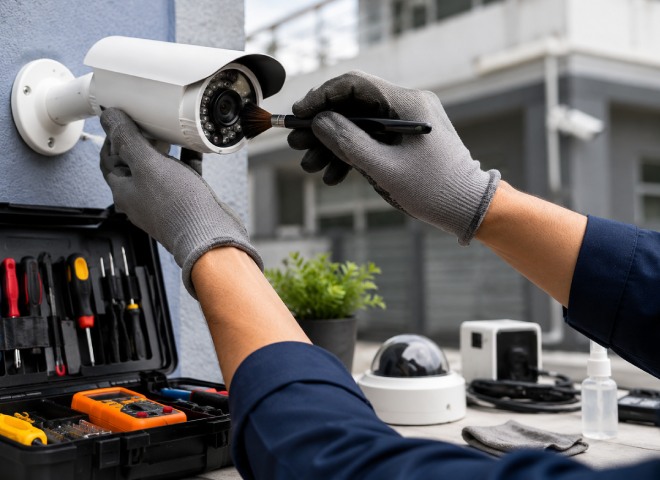
1. Clean the Camera Lens
A dirty lens is one of the biggest reasons for blurry security footage.
Use:
- Microfiber cloth
- Lens cleaning solution
- Soft air blower
Avoid:
- Paper towels
- Abrasive cloths
- Harsh chemicals
Always wipe gently using circular motions.
2. Remove Dust and Spider Webs
Outdoor cameras often attract insects and spiders because infrared LEDs emit warmth at night.
Check for:
- Spider webs
- Dust buildup
- Leaves
- Bird nests
- Insects
Keeping the camera housing clean improves visibility and prevents false motion alerts.
3. Inspect Camera Housing
Carefully examine the camera body for signs of damage.
Look for:
- Cracks
- Loose screws
- Water leaks
- Rust
- Broken mounting brackets
Damaged housing can allow moisture inside the camera, causing permanent failure.
4. Check Camera Position
Strong winds or accidental impacts can shift camera angles. Ensure every camera still covers:
- Entrances
- Parking areas
- Driveways
- Gates
- Hallways
- Storage rooms
Adjust cameras whenever necessary.
5. Test Day and Night Vision
Your CCTV camera should capture clear images both during daylight and after dark.
Verify:
- Image brightness
- Infrared LEDs
- Colour accuracy
- Night visibility
- Automatic day/night switching
Replace faulty infrared LEDs if nighttime images appear too dark.
6. Inspect Cables and Connections
Loose or damaged cables are a common cause of video loss.
Check:
- Power cables
- Ethernet cables
- Coaxial cables
- BNC connectors
- RJ45 connectors
Replace frayed or damaged cables immediately.
7. Verify Power Supply
An unstable power source can interrupt recordings.
Inspect:
- Power adapters
- UPS backup
- Voltage output
- Power connectors
If available, install a surge protector to safeguard your CCTV equipment.
8. Check DVR or NVR Storage
Your recording device should always have enough storage space.
Review:
- Hard drive health
- Recording schedule
- Storage capacity
- Overwrite settings
- Recording status
A failing hard drive can result in missing security footage.
9. Update Firmware
Manufacturers regularly release firmware updates to improve:
- Security
- Performance
- Compatibility
- Bug fixes
Always install updates from the official manufacturer to keep your CCTV system secure.
10. Test Remote Viewing
If you monitor your cameras using a smartphone or computer, regularly verify that remote access is functioning.
Check:
- Live streaming
- Playback
- Notifications
- Mobile application
- Internet connection
Resolve connection issues before an emergency occurs.
Seasonal CCTV Camera Maintenance Tips
Different seasons create unique challenges for outdoor surveillance systems.
Summer
- Remove accumulated dust
- Protect cameras from direct sunlight where possible
- Ensure proper ventilation
Rainy Season
- Inspect waterproof seals
- Check for moisture inside camera housing
- Examine outdoor cable protection
Winter
- Remove frost or snow from camera lenses
- Ensure infrared lighting is unobstructed
- Check mounting brackets after strong winds
Common Signs Your CCTV Camera Needs Maintenance
Don’t ignore these warning signs:
- Blurry images
- Flickering video
- No signal errors
- Camera disconnects frequently
- Water inside the housing
- Poor night vision
- Random recording failures
- Camera overheating
Early maintenance prevents expensive repairs later.
CCTV Maintenance Mistakes to Avoid
Avoid these common errors:
- Cleaning with household cleaners
- Spraying water directly onto cameras
- Ignoring firmware updates
- Leaving loose cables exposed
- Skipping regular inspections
- Using rough cloths on the lens
- Blocking ventilation openings
Small mistakes can significantly reduce the lifespan of your CCTV equipment.
Professional CCTV Maintenance vs DIY
Basic maintenance can easily be handled by most homeowners and business owners.
DIY tasks include:
- Cleaning lenses
- Removing dust
- Checking camera angles
- Inspecting cables
- Testing recordings
However, professional servicing is recommended for:
- Electrical issues
- Network configuration
- Camera replacement
- Hard drive upgrades
- Complex system troubleshooting
An annual professional inspection helps ensure your security system remains in peak condition.
Tips for Longer CCTV Camera Life
Follow these simple habits to maximise your system’s lifespan:
- Clean lenses regularly.
- Keep camera housings free from dirt and insects.
- Inspect cables every few months.
- Test recordings weekly.
- Back up important footage.
- Update firmware whenever available.
- Replace failing hard drives before they stop working.
- Schedule professional servicing once a year.
Consistent maintenance can add years to the life of your CCTV system while ensuring dependable performance.
FAQs
1. How often should CCTV cameras be maintained?
Outdoor cameras should be maintained every 2–3 months, while indoor cameras generally require inspection every 4–6 months.
2. Can I clean CCTV camera lenses myself?
Yes. Use a clean microfiber cloth and a suitable lens cleaning solution. Avoid abrasive materials and harsh chemicals.
3. Why is my CCTV footage blurry?
Common causes include dirty lenses, incorrect focus, condensation, damaged camera housing, or a shifted camera position.
4. How long do CCTV cameras usually last?
Most quality CCTV cameras last between 5 and 10 years, depending on their build quality, environmental conditions, and maintenance routine.
5. Should CCTV firmware be updated?
Yes. Firmware updates improve security, fix software bugs, enhance performance, and ensure compatibility with newer devices.
Final Thoughts
A reliable surveillance system depends on more than just high-quality equipment. Following a regular CCTV Camera Maintenance Guide helps you maintain sharp video quality, prevent unexpected failures, and protect your investment for years to come.
By cleaning camera lenses, checking cables, testing recordings, updating firmware, and inspecting your DVR or NVR regularly, you can ensure your CCTV system is always ready when it matters most. A little maintenance today can save significant repair costs tomorrow while keeping your property safe around the clock.